
Getting Started
Purpose
Section titled “Purpose”OneLastClick Project Settings lets you expose ScriptableObject settings directly in Unity’s Project Settings, without manually creating or managing assets.
Settings are stored in the project’s ProjectSettings folder and use Unity’s standard inspector.
Quick Start
Section titled “Quick Start”Add the [ProjectSettings] attribute to any ScriptableObject.
using OneLastClick.ProjectSettings;using UnityEngine;
[ProjectSettings]public class ExampleProjectSettings : ScriptableObject{    [SerializeField] public int IntValue;    [SerializeField] public GameObject Prefab;    [SerializeField] public string Message = "Hello, World!";}
Your settings will automatically appear under:
Edit → Project Settings → Example Project Settings
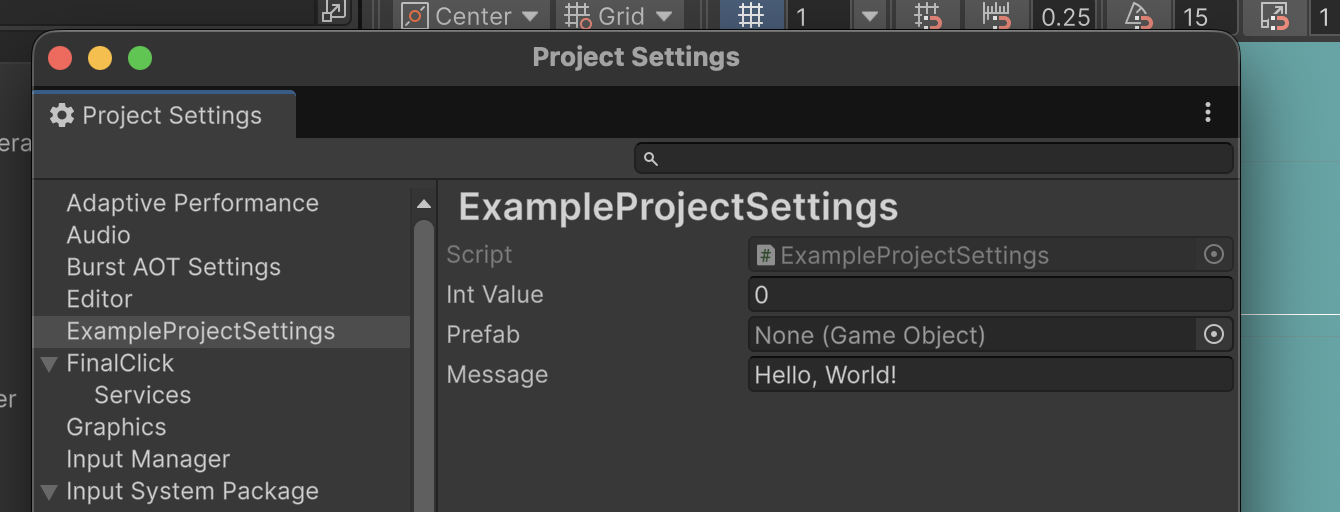
No asset needs to be created manually.